
How to Read a DMARC Aggregate Report Without Misreading SPF and DKIM
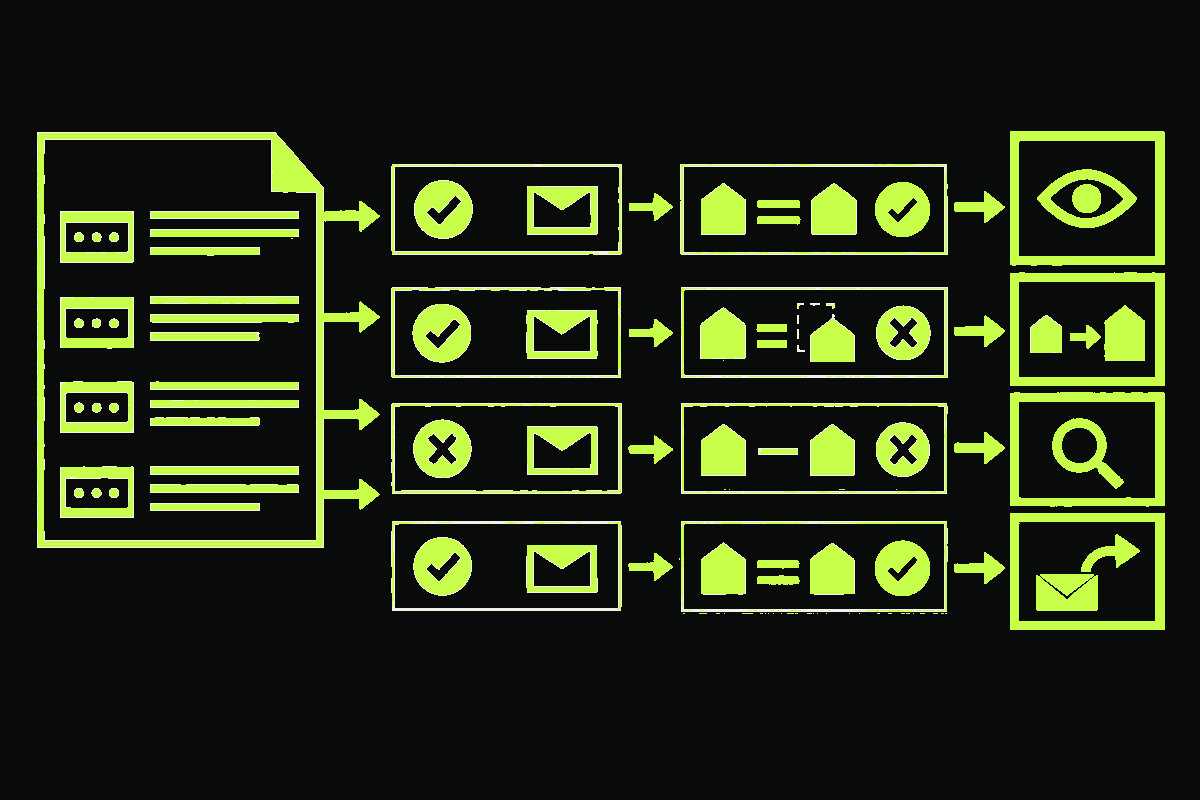
I ran one hypothetical daily DMARC report through a small triage fixture:
317 messages observed
286 passed DMARC alignment
26 received the published quarantine action
5 were overridden for a mailing-list path
5/5 fixture checks passed
That is the useful way to read a DMARC aggregate report. Start with the reporting period and published policy, then read each source IP’s DMARC-aligned result, and only then inspect the raw SPF and DKIM results that explain it.
Do not turn every failing row into “spoofing.” A known sender can authenticate successfully but still fail DMARC because its domains do not align with the visible From domain. An unknown source deserves investigation, not an automatic verdict.
The fixture below uses documentation IP ranges and .example domains. No production traffic or customer data is involved.
Read the report in three layers
RFC 9990, published in May 2026, defines the current aggregate-report format. A report is an XML document for one DMARC policy domain and one policy configuration.
I read it in this order:
- Report context: who generated it, its unique report ID, the UTC date range, and the policy the receiver observed.
- DMARC outcome: the source IP, message count, applied disposition, and the aligned DKIM and SPF results in
policy_evaluated. - Authentication evidence: the visible From domain, envelope domain, DKIM signing domain and selector, plus the raw SPF and DKIM results in
auth_results.
One record represents a tuple of source, result, and authentication identifiers. Its count is the number of messages matching that tuple. It is not a count of people, campaigns, or inbox deliveries.
The same record can say “SPF pass” and “SPF fail”
This is the part most likely to send someone toward the wrong DNS record.
Here is one shortened record from my hypothetical fixture:
<row>
  <source_ip>192.0.2.10</source_ip>
  <count>286</count>
  <policy_evaluated>
    <disposition>pass</disposition>
    <dkim>pass</dkim>
    <spf>fail</spf>
  </policy_evaluated>
</row>

<identifiers>
  <envelope_from>bounces.sender.example</envelope_from>
  <header_from>example.com</header_from>
</identifiers>

<auth_results>
  <dkim>
    <domain>example.com</domain>
    <selector>mail2026</selector>
    <result>pass</result>
  </dkim>
  <spf>
    <domain>bounces.sender.example</domain>
    <result>pass</result>
  </spf>
</auth_results>
Raw SPF passed for bounces.sender.example. DMARC’s SPF branch failed because that domain did not align with the visible example.com From domain. DKIM passed with d=example.com, so the aligned DKIM branch passed and the message passed DMARC overall.
policy_evaluated answers the DMARC alignment question. auth_results reports the underlying authentication results without interpreting them for DMARC. RFC 9990 makes that separation explicit.
If you need a refresher on the identity comparison itself, my SPF, DKIM, and DMARC walkthrough owns that explanation.
Turn the XML into a source inventory
The report tells you which IP sent the mail. It does not tell you whether your team owns that stream. That mapping has to come from your own sender inventory.
My 317-message fixture produces four different jobs:
| Source | Count | Observed result | Next action |
|---|---|---|---|
192.0.2.10 |
286 | Known sender; DMARC passes through aligned DKIM | Keep monitoring |
198.51.100.20 |
18 | Known billing sender; raw SPF and DKIM pass, but neither aligns | Align the envelope domain or DKIM signing domain |
203.0.113.30 |
8 | Unknown source; both authentication and alignment fail | Investigate ownership and message samples available elsewhere |
203.0.113.40 |
5 | Known mailing-list path; DMARC fails and the receiver records an override | Review the indirect path before tightening policy |
The second row is the one a superficial dashboard can hide. Authentication passed. Alignment did not. Adding another SPF include would not fix it.
The third row is suspicious, but the report alone cannot prove abuse. RFC 9989 notes that failing streams can be illegitimate use or legitimate senders with missing or unaligned authentication. Name the source before deciding which one it is.
Disposition is not an inbox-placement result
In an RFC 9990 report, disposition records the DMARC action applied to that row: none, pass, quarantine, or reject.
It does not say where a delivered message appeared in the recipient’s mailbox. Aggregate counts can include messages that another filtering layer ultimately blocked. A DMARC pass is also not proof that the message was safe or wanted.
If alignment failed but the applied disposition differs from the published policy, read the reason element. RFC 9990 defines values including mailing_list, trusted_forwarder, local_policy, and policy_test_mode.
That override is evidence about the receiver’s handling. It is not permission to ignore the failing stream. Indirect delivery can legitimately break authentication, as the email forwarding trace shows.
Collect reports before enforcement
To request aggregate reports, publish a rua destination in the DMARC record. A basic monitoring record looks like this:
_dmarc.example.com. IN TXT "v=DMARC1; p=none; rua=mailto:dmarc-reports@example.com"RFC 9989 recommends starting in monitoring mode so the reports can reveal forgotten services and alignment failures before enforcement. If the report mailbox sits on another organizational domain, that destination normally needs a DNS authorization record described by RFC 9990’s external-destination check.
You can inspect the policy currently published for a domain with the emailverifier.dev DMARC checker. It reads the DNS policy and reporting destinations. It does not parse aggregate-report attachments or tell you whether a particular sending source is yours.
Current reports use the urn:ietf:params:xml:ns:dmarc-2.0 namespace. During migration, keep older report support instead of assuming every receiver switched formats together. The RFC 9989 migration guide covers that parser boundary and the other protocol changes.
Treat every report attachment as untrusted input
DMARC reports usually arrive as compressed XML. That makes the ingestion path a parser exposed to email from outside your system.
RFC 9990 warns specifically about ZIP bombs and XML bombs. I would enforce compressed and expanded size limits, reject nested archives, disable external XML entities, validate the expected namespace and schema, and process the file outside the mail-handling request.
Deduplicate reports before adding their counts. Use the reporting organization, policy domain, and report_id together, then flag overlapping date ranges rather than silently summing them. The standard requires a unique report ID and acknowledges that duplicate or partially overlapping reports can still happen.
Aggregate reports exclude individual email addresses and message content, but sending patterns can still expose sensitive business activity, especially for a small organization. Restrict access and set an intentional retention period.
A useful review ends with named owners
After parsing, group rows by known service, aligned pass or fail, applied disposition, and override reason. Preserve the raw count and the domains that actually authenticated.
Then assign each material stream to one of four queues: observe, fix alignment, investigate source, or review an indirect path. Give every known failing service an owner and a concrete identity to align.
In my fixture, the result is not “31 bad emails.” It is one healthy transactional stream, one billing integration with an alignment defect, one unknown source to investigate, and one mailing-list path that needs careful review. That is enough information to make the next change without guessing.