
Does DMARC Stop Phishing? What It Blocks and What It Misses
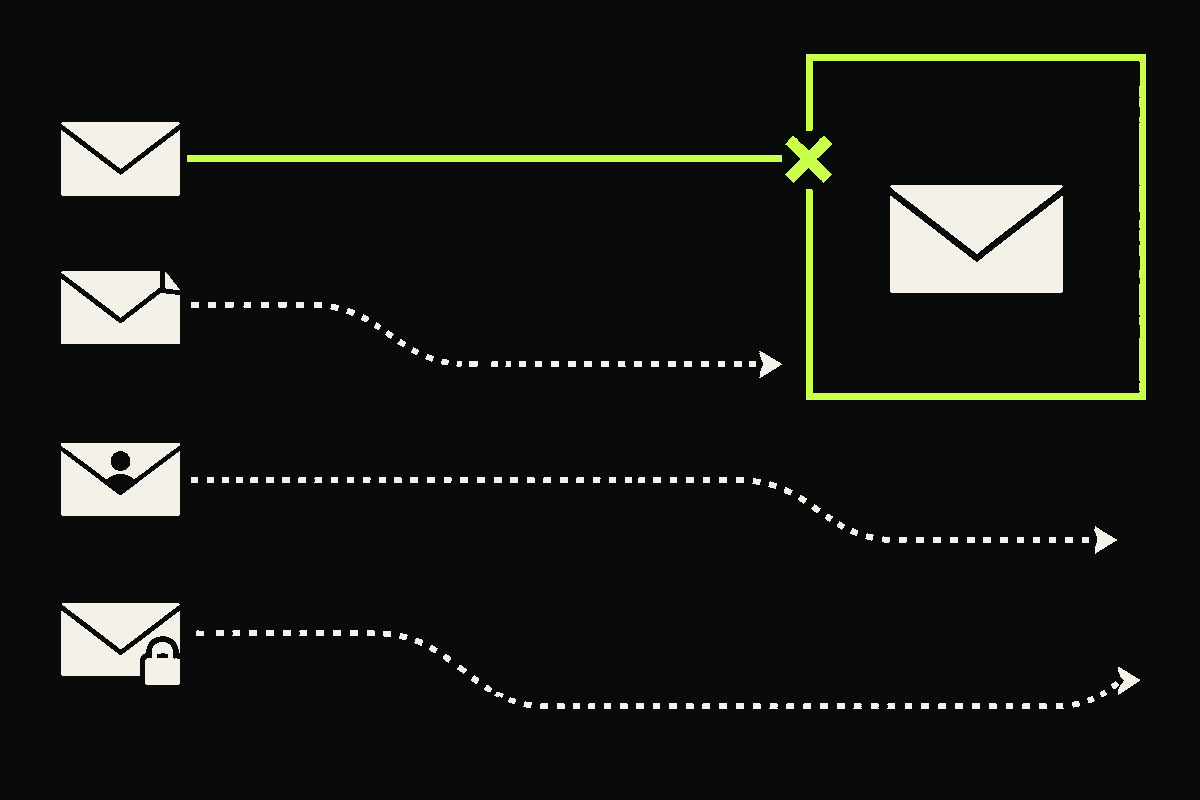
DMARC can stop one important kind of phishing: unauthorized use of your exact domain in the visible From address. It does not stop lookalike domains, deceptive display names, or phishing sent from a real compromised account.
That distinction matters because “DMARC stops phishing” is both useful advice and an easy claim to overextend. I think the safest way to understand it is to follow four hypothetical messages through the same boundary.
What boundary does DMARC actually protect?
DMARC starts with the domain in the RFC5322.From field, the address a mail client normally presents as the author. It then asks whether SPF or DKIM passed with a domain aligned to that From domain.
A pass means the domain’s use was authorized. It does not mean the message is honest, harmless, or wanted. The current DMARC standard, RFC 9989, says this directly.
The four paths below use reserved example domains. They are scenarios, not live tests.
Path 1: the attacker spoofs your exact domain
Suppose your company uses company.example, and an attacker sends this visible address without permission:
- Visible From
finance@company.example- Authentication
- No aligned SPF or DKIM pass
- DMARC result
- Fail
This is the attack DMARC is designed to address. If company.example publishes an enforcement policy, the receiving system can quarantine or reject the failure. The receiver still makes the final handling decision. A published p=reject value is a requested disposition, not a remote command that every receiver must obey.
There is an operational catch. You need to authenticate and align every legitimate mail stream first. Marketing platforms, support systems, billing tools, and less obvious senders can otherwise look like unauthorized traffic. Aggregate reports help you find those gaps before enforcement.
Path 2: the attacker uses a lookalike domain
Now the attacker registers a different domain that looks plausible at a glance:
- Visible From
finance@company-payments.example- Authentication
- The attacker may correctly authenticate their own domain
- Your DMARC policy
- Not evaluated, because your domain is not in From
Your company.example policy cannot govern a domain you do not own. This remains true if the substitute uses a misspelling, extra word, different top-level domain, or Unicode characters that resemble familiar letters.
RFC 9989 explicitly excludes visually similar domain names from DMARC’s protection. This path needs different controls, such as monitoring likely lookalikes, defensive registration where it is proportionate, and inbound detection that compares the displayed domain with domains your users trust.
Path 3: the display name impersonates a person or role
A mail client may emphasize the friendly name and make the actual address less prominent:
- Visible From
“Finance Team” <attacker@example.net>- Authentication
example.netmay pass SPF, DKIM, and DMARC- DMARC result
- Potentially pass
DMARC evaluates the domain in the address, not the human-readable display name. It cannot decide whether “Finance Team” truthfully identifies the sender. The standard calls display-name attacks out as out of scope.
Inbound impersonation rules can help here, especially for executives, finance roles, and support identities. So can interface choices that reveal the full sender address. Neither should turn into a blanket claim that a flagged message is malicious. Similarity is a risk signal, not proof.
Path 4: the real account or an authorized sender is compromised
The hardest path uses infrastructure that your domain already authorizes:
- Visible From
finance@company.example- Authentication
- Aligned SPF or DKIM passes
- DMARC result
- Pass
If an attacker controls a real mailbox, API credential, or approved sending system, DMARC can produce the technically correct result. The domain authorized the message path. DMARC does not inspect the sender’s intent or the safety of a payment link.
This is why I would never label a DMARC pass as “safe.” Protect authorized senders with strong access controls, narrow credentials, monitoring, and phishing-resistant authentication where practical. NIST’s current authentication guidance explains why cryptographic, verifier-bound methods resist credential phishing in a way that manually entered codes do not.
If DMARC misses three paths, is it still worth deploying?
Yes. Closing exact-domain spoofing is a concrete security win, and DMARC reporting gives domain owners evidence about authenticated, misconfigured, and unauthorized mail streams. The mistake is asking that control to solve attacks outside its identity boundary.
I would give each control a narrow job:
- SPF and DKIM: authenticate sending paths and signatures.
- DMARC: require alignment with the visible From domain, publish handling preferences, and request reports.
- Lookalike and display-name defenses: identify deceptive identities that do not use your exact domain.
- Account security: reduce abuse of real mailboxes and authorized senders.
- Message and workflow controls: inspect risky content and independently verify sensitive requests, such as changes to payment details.
You can inspect a domain’s published record with our DMARC checker. A record is only the policy layer, though. Before moving to enforcement, map every legitimate sender and review the reports. Our guide to SPF, DKIM, and DMARC explains the alignment test, while the email forwarding guide covers an important source of legitimate authentication failures.
The useful promise is precise: DMARC helps receivers distinguish authorized use of your exact From domain from unauthenticated use. Keep that boundary clear, and it becomes a strong layer in a phishing defense instead of a false sense of safety.