
Null MX vs No MX Record: The Difference That Changes Verification
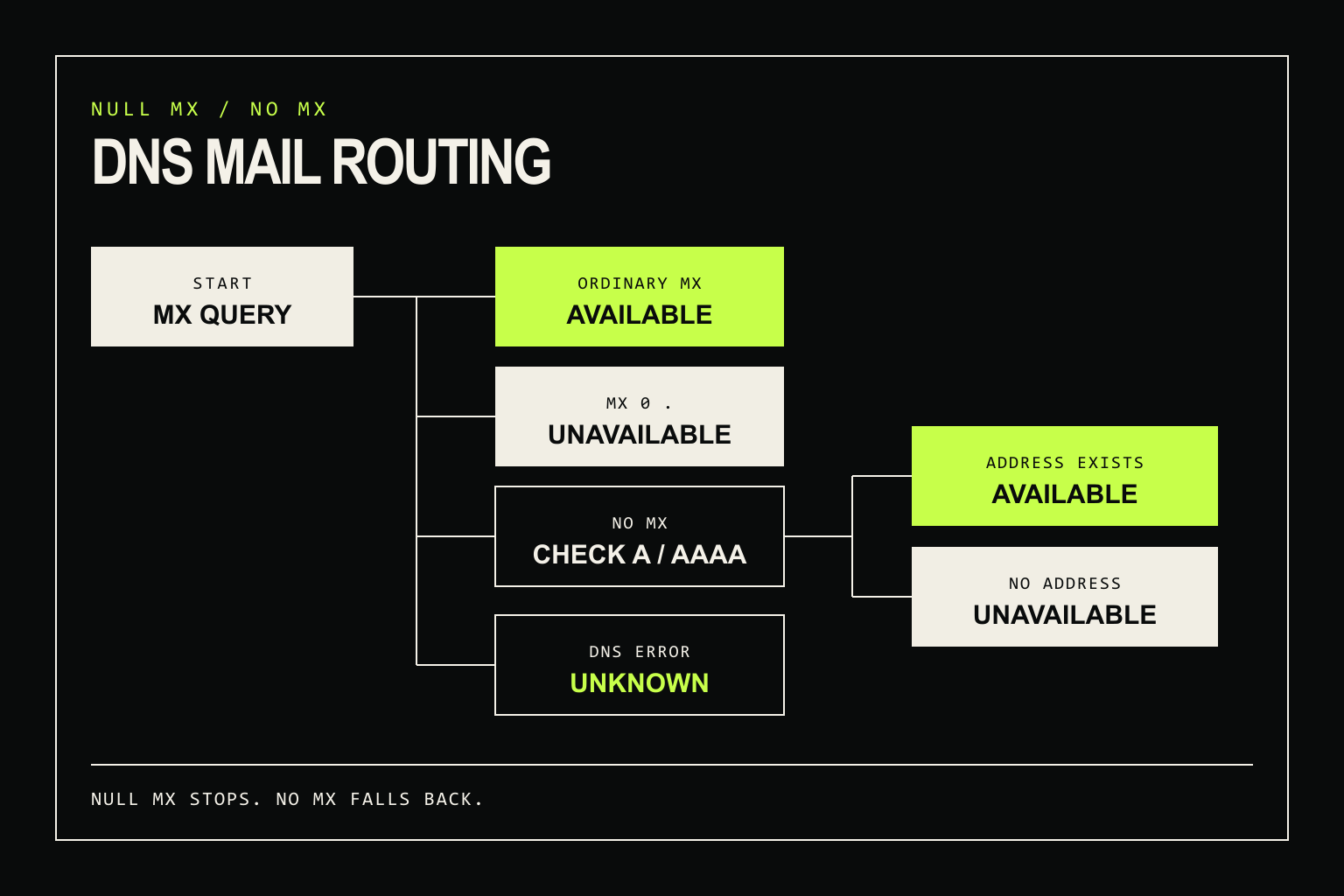
A null MX record and an empty MX answer mean different things.
MX 0 . is an explicit statement that a domain does not accept email. No MX records means the sender must check the domain's A or AAAA records and may treat the domain itself as the mail target. If your verifier turns both cases into “no mail server,” it will reject some routable domains.
The safe rule is simple: recognize null MX as a confirmed routing failure, follow the implicit-MX fallback when the MX set is empty, and keep DNS errors as unknown.
The six DNS outcomes that matter
| DNS result | What it means | Verification result |
|---|---|---|
| One or more ordinary MX records | The domain publishes mail exchangers. | Mail routing is available. Continue with mailbox-level checks. |
MX 0 . |
The domain explicitly accepts no mail. | Mail routing is unavailable. |
| No MX, but an A or AAAA record exists | SMTP's implicit-MX rule points mail at the domain itself. | Mail routing is available, but the mailbox is not yet proven. |
| No MX, A, or AAAA record | There is no usable destination for mail. | Mail routing is unavailable. |
| NXDOMAIN | The domain does not exist in DNS. | Confirmed domain failure. |
| Timeout, SERVFAIL, or an incomplete lookup | The resolver did not provide enough evidence. | Unknown. Retry instead of blocking. |
What does a null MX record look like?
RFC 7505 defines the null MX record as a single MX record with preference 0 and the DNS root, written as ., in the exchange field:
@ IN MX 0 .The dot is not an unusually short mail-server hostname. It is the signal that no mail exchanger exists for the domain.
A conforming null-MX domain must not publish any other MX record. If you see 0 . beside an ordinary MX host, surface a DNS configuration error. Do not silently interpret the mixed set as a clean mail route.
Null MX is useful for web-only domains, parked domains, and infrastructure hostnames that should never receive email. It lets senders fail immediately instead of trying an A or AAAA address that happens to serve a website.
Why no MX record is not a failure by itself
RFC 5321, section 5.1 says that an empty MX list creates an implicit MX record with preference 0 pointing to the domain itself. The sender then resolves that name to an A or AAAA address.
This fallback is old, but it is still part of SMTP. The correct lookup order is:
- Query MX for the destination domain.
- If usable MX records exist, sort them by preference and use their hosts.
- If the only record is
0 ., stop. The domain does not accept mail. - If the MX answer is empty, query A and AAAA for the original domain.
- If an address exists, treat the domain as the mail target.
- If DNS returns a temporary error, preserve uncertainty and retry.
An address record only establishes a possible route. It does not show that port 25 is reachable, that an SMTP server is listening, or that a particular recipient exists. Those are later checks.
How to inspect a domain from the command line
Start with its MX set:
dig +short MX your-domain.comInterpret the answer before doing anything else:
10 mx1.your-domain.com.   # ordinary MX
0 .                       # null MX
                          # empty answer: check A and AAAA
When the MX answer is empty, run both address lookups:
dig +short A your-domain.com
dig +short AAAA your-domain.com
dig +short hides the DNS response code, so use the full output when you need to distinguish an empty answer from NXDOMAIN or SERVFAIL. A production resolver should keep those states separate.
A resolver decision tree you can implement
The following pseudocode is intentionally resolver-agnostic. The important part is the state model, not a particular DNS library.
function classifyMailRouting(domain) {
  const mx = queryDns(domain, 'MX')

  if (mx.temporaryFailure) return 'unknown'
  if (mx.nxDomain) return 'unavailable'

  if (mx.records.length === 1
      && mx.records[0].preference === 0
      && mx.records[0].exchange === '.') {
    return 'unavailable'
  }

  if (mx.records.some(record => record.exchange !== '.')) {
    return 'available'
  }

  const [a, aaaa] = queryDnsTogether(domain, ['A', 'AAAA'])

  if (a.temporaryFailure || aaaa.temporaryFailure) return 'unknown'
  if (a.records.length || aaaa.records.length) return 'available'

  return 'unavailable'
}
Real delivery software must also resolve each MX host, try applicable addresses, and handle retries. For verification, the classification above provides a clean domain-level boundary: available, unavailable, or unknown.
Common implementation mistakes
Blocking every empty MX answer
This drops the RFC 5321 fallback and creates false rejections. Check A and AAAA when, and only when, the MX set is empty.
Falling back after a null MX answer
A null MX record exists specifically to prevent that fallback. The domain has already stated that it accepts no mail.
Converting DNS failure into “domain has no email”
A timeout or SERVFAIL says the lookup failed. It says nothing definite about the domain's mail configuration. Return an unknown state, use a bounded retry, and avoid charging a hard failure to the user.
Calling an A record deliverable
An implicit route is not a mailbox verdict. Continue through the same SMTP and catch-all logic you use for an ordinary MX route. The SMTP verification guide covers that next stage.
How signup code should react
| Routing evidence | User-facing action |
|---|---|
| Null MX, NXDOMAIN, or no usable MX/A/AAAA route | Block the submission and ask the user to check the domain. |
| Ordinary MX or implicit MX route | Continue to mailbox verification. Do not call the address deliverable yet. |
| Temporary DNS failure | Retry or allow the user to continue with confirmation. Do not report a missing mail server. |
Cache successful DNS results according to their TTL. Cache temporary failures briefly, if at all. A long negative cache can turn a short resolver incident into hours of rejected signups.
Check the routing state through the API
The emailverifier.dev domain endpoint returns mail_routing as available, unavailable, or unknown:
curl "https://emailverifier.dev/api/v1/domains/your-domain.com" \
  -H "X-API-Key: $EMAILVERIFIER_API_KEY"
Use that field as domain evidence, not proof of a mailbox. Every authenticated domain check uses one credit. The full contract is in the REST API reference.
If you are building the resolver yourself, test ordinary MX, null MX, empty MX with an address fallback, NXDOMAIN, and a forced DNS timeout. Those five fixtures catch the branch that most “MX exists” booleans miss.
Null MX means no mail. No MX means keep looking.