
Role-Based Email Addresses: When to Accept, Review, or Block
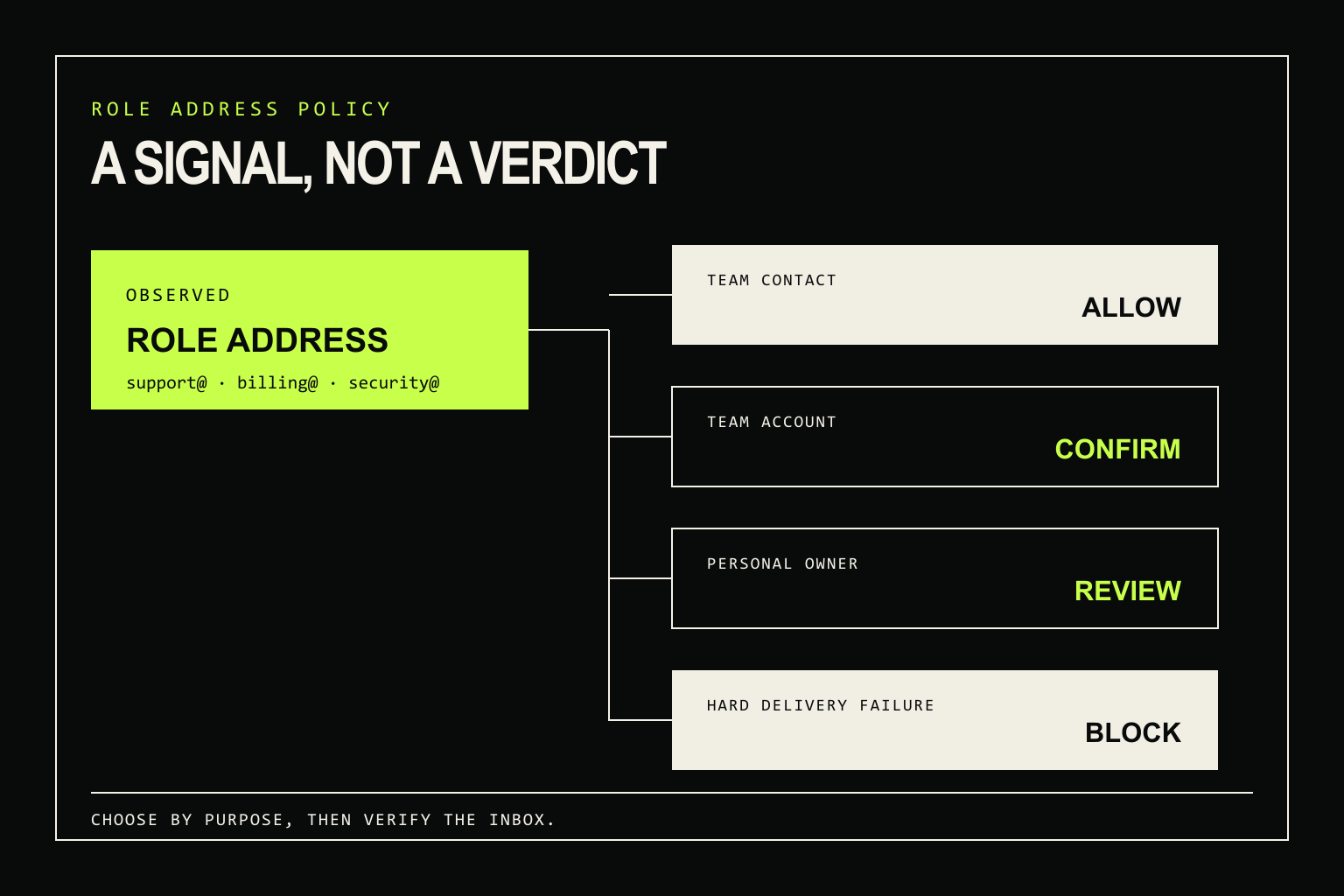
Role-based email addresses such as support@, sales@, billing@, and security@ should not be blocked simply because a team may share them. Accept the address when a team inbox matches the job. Review or confirm it when the account must belong to one person. Block only when a separate verification result or a documented abuse rule justifies the decision.
A role-based signal describes likely ownership. It is not a verdict on syntax, mail routing, disposable-email use, or whether the receiving server accepts the mailbox.
A practical accept, review, or block policy
| Where the address is used | Default action | Reason |
|---|---|---|
| Contact, support, sales, or security-report form | Allow when the other verification checks pass | The form is meant to reach a team or function. |
| Newsletter or product updates | Allow after inbox confirmation | A shared inbox can subscribe, but confirmation and unsubscribe controls still matter. |
| B2B workspace signup | Review until the inbox is confirmed | The address may start the workspace, while individual members need their own identities and permissions. |
| Personal account owner, recovery address, or sensitive approval | Request an individually controlled address or another security factor | Access to a team inbox does not identify one accountable person. |
| One-per-person trial, referral, or credit | Review with product-level abuse controls | An email label cannot prove how many people use the inbox. |
| Confirmed syntax, domain, routing, or mailbox failure | Block | The failure is supported by separate verification evidence, not by the role label. |
| Inconclusive SMTP result or catch-all domain | Review or retry | The available evidence does not support a mailbox rejection. |
The role signal never needs to be the sole reason for a hard block. Its useful job is to tell the application when shared ownership might conflict with the account model.
What the role signal actually measures
The part before @ is the local part. When it names a department, responsibility, or process instead of a person, a verifier may classify the address as role-based. Common examples include admin@, accounts@, help@, jobs@, legal@, and privacy@.
Detection is heuristic. An exact normalized alias such as support@ is useful evidence; a substring match is not. supporter@ should not become role-based merely because it contains the word support. Organization-specific names such as hello@ or founders@ may be shared, personal, or routed differently over time.
Keep role, disposable-provider, free-provider, syntax, DNS, SMTP, and catch-all results as separate fields. A role address can be deliverable on a company domain. A named address can be disposable. Neither fact implies the other. If temporary providers are the real concern, use a separate disposable-address policy.
Accept role addresses when the job belongs to a team
Shared ownership is often the intended behavior. A customer wants the available support agent to receive a problem report. A security researcher wants a monitored security inbox, not one employee who may be away or may leave the company. Sales and billing messages often need the same continuity.
Several of these mailboxes are established Internet conventions. RFC 2142 specifies business and operational names including info@, sales@, support@, abuse@, noc@, and security@. It encourages organizations to support the names for functions they provide.
RFC 5321 section 4.5.1 also requires an SMTP server that supports mail relaying or delivery to support postmaster as a case-insensitive local name, apart from the narrow case where the server rejects every connection with a 554 response. Rejecting all role addresses can therefore block the exact mailbox a sender is expected to use.
For team-facing forms, run the normal syntax, routing, disposable-provider, and mailbox checks. If those checks support acceptance, the shared label is not a reason to reverse the result.
Review role addresses when one person must be accountable
A confirmed message to ops@company.com proves that someone with access to the inbox completed the confirmation. It does not reveal which team member acted, whether that person will retain access, or who should control recovery six months later.
That distinction matters for workspace ownership and sensitive actions. A B2B product can let a confirmed team inbox create the workspace, then assign billing, administration, and audit events to individual member accounts. A personal account can ask for an individually controlled address or require MFA before treating the inbox as a recovery factor.
Explain the requirement in the interface. “Use an address controlled by one account owner” gives the user a condition they can satisfy. “Invalid email” is inaccurate when the address is correctly formed and accepts mail.
The same caution applies to one-per-person promotions. A shared inbox might represent ten employees, while ten aliases might route to one person. Device, account, payment, velocity, and prior-redemption controls are better evidence for promotion abuse than the word before @.
Block only when other evidence supports it
A hard block is appropriate for a confirmed syntax failure, invalid domain, unavailable mail route, or rejected recipient. It may also be appropriate when a documented disposable-address rule protects a costly trial or another abuse-prone flow. In each case, the blocking evidence is independent of role ownership.
Timeouts, temporary SMTP responses, policy blocks, and inconclusive probes should remain unknown or under review. A catch-all domain also needs caution because the server may accept every recipient, including addresses that do not map to a real inbox. Neither case becomes more certain because the local part looks familiar.
emailverifier.dev preserves that separation. When an SMTP server accepts a role address, the result can be status: "deliverable", action: "review", and flagged: false, with both role_address and mailbox_accepts_mail in signals. The API reports the evidence; the application decides whether shared ownership fits the form.
Turn the verifier result into application policy
A small policy layer keeps product context out of the verification logic:
const TEAM_INBOX_PURPOSES = new Set([
  'contact',
  'support',
  'sales',
  'security-report'
])

const INDIVIDUAL_OWNER_PURPOSES = new Set([
  'personal-account-owner',
  'account-recovery',
  'security-approval'
])

export function decideEmailUse(result, purpose) {
  if (result.status === 'undeliverable' || result.flagged) {
    return 'block'
  }

  if (result.status !== 'deliverable') {
    return 'review'
  }

  if (!result.signals.includes('role_address')) {
    return result.action
  }

  if (TEAM_INBOX_PURPOSES.has(purpose)) {
    return 'allow'
  }

  if (INDIVIDUAL_OWNER_PURPOSES.has(purpose)) {
    return 'request_individual_address'
  }

  return 'require_confirmation'
}
request_individual_address and require_confirmation are application outcomes, not values returned by the emailverifier.dev API. The public response contract uses allow, review, and block for action; the complete schema is in the REST API reference.
Confirmation is still a separate step. Verification evaluates the address and available mail-system evidence; confirmation shows that someone can act on a message sent to the inbox. The validation, verification, and confirmation guide explains where each check belongs.
With this policy, support@company.com can proceed through a support form after verification. The same address can trigger a request for an individually controlled address when someone opens a personal account, because the two forms require different proof from the user.