
Maximum Email Address Length: Why 254 Bytes Beats 320 Characters
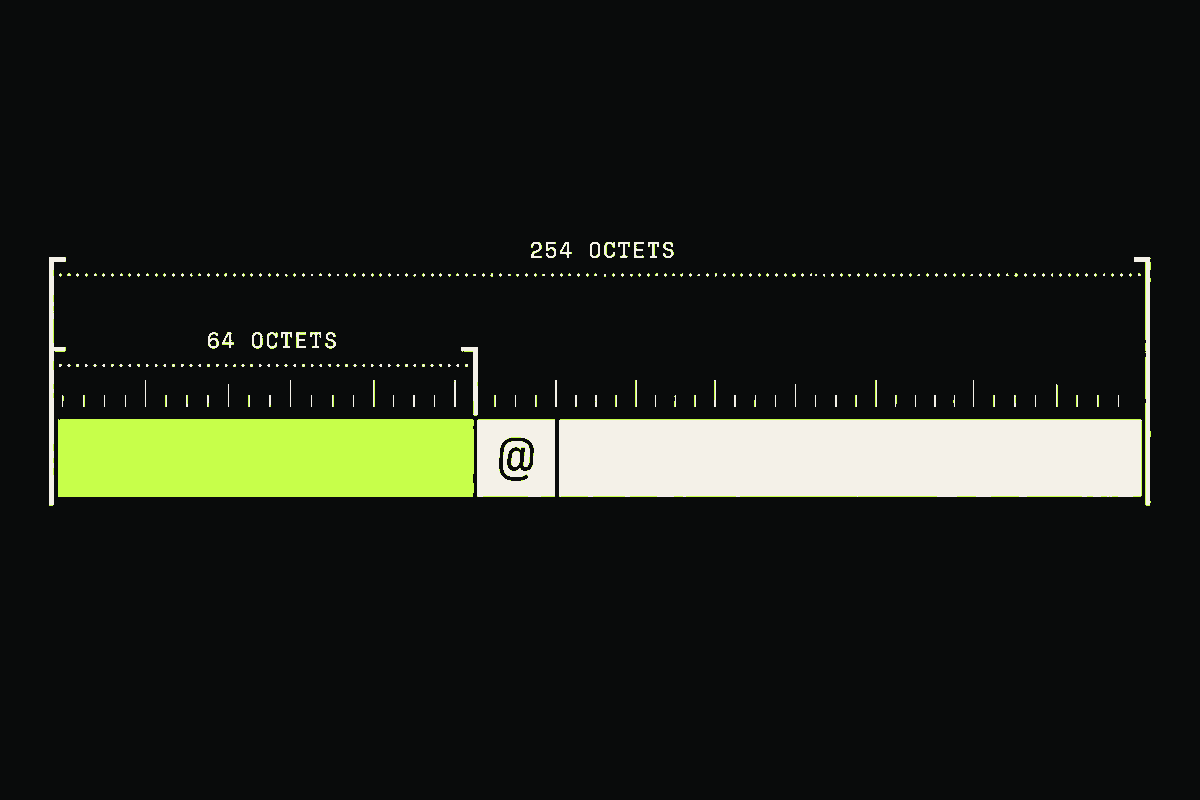
The practical maximum length for a normal email address is 254 octets, not 320 characters. The local part before @ has its own 64-octet ceiling, and Unicode can use more than one octet per character.
I would enforce those two limits on the server. A browser maxlength="254" is useful for ordinary ASCII input, but it is not an SMTP byte counter.
Where does the 254-octet limit come from?
RFC 5321 sets three relevant sizes: 64 octets for the local part, 255 octets for a domain, and 256 octets for a reverse-path or forward-path. That last limit wins.
An SMTP recipient path normally wraps the mailbox in angle brackets:
RCPT TO:<local-part@domain>
         ^                     ^
         two path octets
The standard defines the path as <Mailbox>. Remove the two brackets from the 256-octet path allowance and the mailbox inside can occupy 254 octets.
So why does 320 keep appearing? Well, 64 + 1 + 255 = 320, but that arithmetic ignores the smaller path limit. A local part and domain cannot both reach their individual maxima inside a normal 256-octet SMTP path.
There is a fair objection here: RFC 5321 tells implementations to avoid imposing limits where possible, and clients may try larger objects. True. A server can support more, but it may reject an object beyond the required sizes. For a signup address that must survive ordinary SMTP transport, 254 octets is the useful interoperability boundary.
Can you reproduce the boundary?
Yes. This Node.js script checks only the length budget. It deliberately does not pretend to validate the full email grammar or prove that a mailbox exists.
import { Buffer } from 'node:buffer'
import { domainToASCII } from 'node:url'

function checkSmtpLength(input) {
  const at = input.lastIndexOf('@')

  if (at <= 0 || at === input.length - 1) {
    return { ok: false, reason: 'missing local part or domain' }
  }

  const local = input.slice(0, at)
  const domain = domainToASCII(input.slice(at + 1))

  if (!domain) {
    return { ok: false, reason: 'domain cannot be converted to ASCII' }
  }

  const localOctets = Buffer.byteLength(local, 'utf8')
  const mailboxOctets = localOctets + 1 + Buffer.byteLength(domain, 'ascii')

  if (localOctets > 64) {
    return {
      ok: false,
      localOctets,
      mailboxOctets,
      reason: 'local part exceeds 64 octets'
    }
  }

  if (mailboxOctets > 254) {
    return {
      ok: false,
      localOctets,
      mailboxOctets,
      reason: 'mailbox exceeds 254 octets'
    }
  }

  return { ok: true, localOctets, mailboxOctets }
}
Buffer.byteLength() measures the encoded byte length, unlike JavaScript string length. domainToASCII() converts an internationalized domain to its DNS form and returns an empty string when conversion fails.
I ran the function against six hypothetical boundary cases:
const domain189 = `${'b'.repeat(63)}.${'c'.repeat(63)}.${'d'.repeat(61)}`
const domain190 = `${'b'.repeat(63)}.${'c'.repeat(63)}.${'d'.repeat(62)}`

const cases = [
  ['64-byte ASCII local part', `${'a'.repeat(64)}@example.com`],
  ['65-byte ASCII local part', `${'a'.repeat(65)}@example.com`],
  ['254-byte mailbox', `${'a'.repeat(64)}@${domain189}`],
  ['255-byte mailbox', `${'a'.repeat(64)}@${domain190}`],
  ['32-character UTF-8 local part', `${'é'.repeat(32)}@example.com`],
  ['33-character UTF-8 local part', `${'é'.repeat(33)}@example.com`]
]

for (const [name, email] of cases) {
  console.log(name, checkSmtpLength(email))
}
The output exposes both boundaries:
64-byte ASCII local part   ok: true,  localOctets: 64, mailboxOctets: 76
65-byte ASCII local part   ok: false, localOctets: 65, mailboxOctets: 77
254-byte mailbox           ok: true,  localOctets: 64, mailboxOctets: 254
255-byte mailbox           ok: false, localOctets: 64, mailboxOctets: 255
32-character UTF-8 local   ok: true,  localOctets: 64, mailboxOctets: 76
33-character UTF-8 local   ok: false, localOctets: 66, mailboxOctets: 78
The long domains are constructed test fixtures, not claims that those mailboxes exist. Passing this function means only that the input fits the SMTP length budget.
Why does Unicode break character counting?
SMTPUTF8 permits UTF-8 in mailbox names, while internationalized domains must be processed through IDNA for DNS. It does not turn the 64-octet local-part limit into 64 Unicode characters.
In UTF-8, é uses two octets. That is why 32 copies fit the local-part budget and 33 copies do not, even though both strings look comfortably shorter than 64 characters.
If your product accepts internationalized addresses, the browser and server now have different jobs. The browser can provide immediate format and length feedback. The server must convert the domain, count the encoded bytes, and decide whether the rest of the mail stack supports SMTPUTF8. I covered that compatibility decision separately in the SMTPUTF8 signup guide.
Should your database column be 254 or 320 characters?
I would not use a database column width as the validator. Store the original input in a Unicode-capable text field with enough room for operational safety, then apply the SMTP length policy in application code before the value reaches account creation or outbound mail.
A 254-character column can still be awkward when the database measures bytes, and a 320-character column does not make a 320-octet mailbox transportable. Storage capacity and acceptance policy are separate decisions (databases do enjoy making simple questions weird).
Preserve the submitted address, derive any comparison form consistently, and keep the length result separate from later verification evidence. The safe email storage model covers the identity side of that design.
Where should the check sit in a signup flow?
- Reject an empty value or a missing local part and domain.
- Convert the domain to its ASCII form and enforce 64 local-part octets plus 254 mailbox octets on the server.
- Run your normal syntax policy. A byte count cannot recognize dots, quoting, or other grammar rules.
- Verify routing and mailbox evidence, then send a confirmation message when account ownership matters.
The HTML maxlength attribute can remain a client-side convenience, but repeat the authoritative check on the server. Client constraints are bypassable even before Unicode enters the conversation.
The emailverifier.dev API accepts an email string up to 254 characters and returns syntax, routing, risk, and mailbox evidence as separate signals. A length failure is a confirmed input failure. A timeout, SMTP policy block, catch-all response, or other inconclusive result is still unknown, not proof that the mailbox is invalid.
Use 254 octets for the complete mailbox, 64 for the local part, and count the bytes on the server.