
Zod Email Validation: What z.email() Accepts, and Where to Add a Real Check

In Zod 4, validate an email with z.email(). The older z.string().email() still works but is marked @deprecated in Zod's type definitions, and both use the same regex. That regex is a good format gate. It is not a length check, it does not trim, and it knows nothing about whether the domain takes mail or the address is disposable.
The part most tutorials get wrong comes after that. The usual next step is .refine(async (email) => callSomeApi(email)). In Zod 4 that refinement still runs when z.email() has already failed, so every typo in your form spends a verification request. I tested this on zod 4.6.7 and Node 22. Below are the results and the schema I would ship instead.
The basics, and three things z.email() lets through
import * as z from "zod";

const email = z.email({ error: "Enter a valid email address" });

console.log(email.safeParse("ada@example.com").success);          // true
console.log(email.safeParse("ada@example").error?.issues[0].message);
console.log(z.string().email().safeParse("ada@example.com").success); // deprecated, same regex
console.log(email.safeParse(" ada@example.com").success);         // leading space
console.log(email.safeParse("a".repeat(300) + "@example.com").success); // 312 chars
true
Enter a valid email address
true
false
truePass custom messages with error. Zod 3's message key is still accepted, but error is the Zod 4 name. The last two lines are the ones to remember:
- Whitespace fails. Mobile keyboards and password managers add trailing spaces. Without
.trim()before the format check, a real user gets "Enter a valid email address". - There is no length limit. A 312-character address passes. RFC 5321 caps the path at 254 octets and the local part at 64; the email address length guide explains where those numbers come from. The emailverifier.dev API's OpenAPI schema caps the
emailfield at 254 characters and answers longer input with a 400, so a schema without.max(254)passes input the server will refuse. - Case is preserved. Zod does not normalize. Lowercase the domain yourself; leave the local part alone. The case sensitivity guide covers why.
Which regex preset should you use?
Zod ships alternative patterns in z.regexes, passed as z.email({ pattern: z.regexes.html5Email }). I ran 20 addresses through the default and three presets. Fourteen are shown; the other six (plain, plus-tagged, apostrophe and punycode addresses, plus a trailing dot that behaves like the leading dot) add nothing new. Bold marks a result that contradicts the RFCs:
| Input | Per RFC 5321/5322 | z.email() |
html5Email |
rfc5322Email |
unicodeEmail |
|---|---|---|---|---|---|
user@example.com (leading space) |
invalid as typed | rejects | rejects | rejects | rejects |
user..name@example.org |
invalid | rejects | accepts | rejects | accepts |
.user@example.org |
invalid | rejects | accepts | rejects | accepts |
user@-example.com |
invalid | rejects | rejects | accepts | accepts |
(65-character local part)@example.com |
invalid: local part over 64 | accepts | accepts | accepts | rejects |
(308-character address) |
invalid: over 254 | accepts | accepts | accepts | accepts |
user'@example.com |
valid | rejects | accepts | accepts | accepts |
first/last@example.com |
valid | rejects | accepts | accepts | accepts |
user@[192.168.0.1] |
valid (address literal) | rejects | rejects | accepts | accepts |
"john doe"@example.com |
valid (quoted) | rejects | rejects | accepts | rejects |
josé@example.es |
valid with SMTPUTF8 | rejects | rejects | accepts | accepts |
user@bücher.de |
valid (IDN) | rejects | rejects | rejects | accepts |
user@localhost |
valid syntax, not routable | rejects | accepts | rejects | accepts |
user@example.c |
valid syntax, no such TLD | rejects | accepts | rejects | accepts |
Run on zod 4.6.7 with safeParse, 23 November 2026. The zod/v3 build bundled in the same package gave identical results to the default on all 20 inputs.
What the table says:
- The default is the strictest useful choice. It rejects consecutive and leading dots, which the HTML5 pattern accepts. It also rejects some RFC-valid characters (
/, a trailing apostrophe), quoted local parts and IP literals. Real signups almost never use those, so the trade is reasonable. html5Emailmatches the browser. Use it only if you want the server to agree exactly with<input type="email">. It inherits the browser's leniency on dots; the email validation regex guide tests the browser pattern itself.rfc5322Emailaccepts a leading hyphen in the domain, which no registrar will issue.unicodeEmailis for internationalized addresses. It acceptsjosé@example.esanduser@bücher.de, but also nearly anything with one@. Only pick it if your database, mail provider and downstream tools all support SMTPUTF8; the SMTPUTF8 guide lists what has to change.- No preset enforces length. Add
.max(254)and a local-part check whichever you choose.
A field schema you can share with the browser
This is the schema I would put in a shared file, imported by both the form and the server. It has no network calls, so it is safe to bundle:
import * as z from "zod";

// Domains are case-insensitive; local parts are the receiving server's business.
const lowercaseDomain = (email: string) => {
  const at = email.lastIndexOf("@");
  return email.slice(0, at) + email.slice(at).toLowerCase();
};

export const emailField = z
  .string({ error: "Enter your email address" })
  .trim()
  .max(254, { error: "That email address is too long", abort: true })
  .pipe(z.email({ error: "Enter a valid email address", abort: true }))
  .refine((email) => email.lastIndexOf("@") <= 64, {
    error: "The part before the @ is too long",
    abort: true,
  })
  .transform(lowercaseDomain);

export const SignupForm = z.object({
  name: z.string().trim().min(1, { error: "Enter your name" }),
  email: emailField,
  password: z.string().min(12, { error: "Use at least 12 characters" }),
});

export type SignupInput = z.input<typeof SignupForm>;
Each step has a reason. trim runs first so whitespace never reaches the regex. max(254) runs before the regex with abort: true, so a pasted megabyte of text never gets pattern-matched. The local-part refine uses lastIndexOf("@") because the domain cannot contain an @. The transform lowercases only the domain, so Ada.Lovelace@Example.ORG is stored as Ada.Lovelace@example.org.
With the default pattern, every accepted character is ASCII, so .max(254) (which counts UTF-16 code units) equals the octet limit. If you switch to unicodeEmail, check new TextEncoder().encode(email).length instead.
The refine that bills you for typos
The next step in most tutorials is an async refine that asks an API whether the address is real. Here is what that does with bad input:
import * as z from "zod";

let calls = 0;
const fakeApiCheck = async (email: string) => { calls++; return true; };

const withRefine = z.email().refine(fakeApiCheck);
await withRefine.safeParseAsync("not-an-email");
console.log("refine on z.email():          calls =", calls);

calls = 0;
const withAbort = z.email({ abort: true }).refine(fakeApiCheck);
await withAbort.safeParseAsync("not-an-email");
console.log("refine after { abort: true }: calls =", calls);

calls = 0;
const withTransform = z.email().transform(async (email) => { await fakeApiCheck(email); return email; });
await withTransform.safeParseAsync("not-an-email");
console.log("transform on z.email():       calls =", calls);

try {
  withRefine.safeParse("user@example.com");
} catch (err) {
  console.log((err as Error).message);
}
refine on z.email(): calls = 1
refine after { abort: true }: calls = 0
transform on z.email(): calls = 0
Encountered Promise during synchronous parse. Use .parseAsync() instead.Zod 4 treats format errors as continuable, and its docs say refinements only skip after non-continuable issues. So z.email().refine(apiCheck) sends not-an-email to your API. Three fixes, in order of how much I trust them:
- Put the check in a
.transform(). Transforms do not run once an issue exists, with or withoutabort. - Mark the format check
abort: trueso later refinements skip. Easy to forget on one field. - Pass a
whenfunction to the refine that returns false ifpayload.issuesis non-empty. Precise, but verbose.
The same applies at object level: a .refine() on z.object(...) ran my API stub even when a field had failed. An object-level .transform() did not. That is the hook the server-side check below uses.
The last line of the output is the other trap. Once any refine or transform is async, parse and safeParse throw. Use parseAsync or safeParseAsync everywhere the schema runs, including tests.
Server-only verification as an object transform
The check that matters (does the domain route mail, is it disposable, did the mailbox reject the recipient) needs a server call. Keep it in a server-only file so your API key never reaches the client bundle, and attach it to the whole form so it runs once, after everything else has passed:
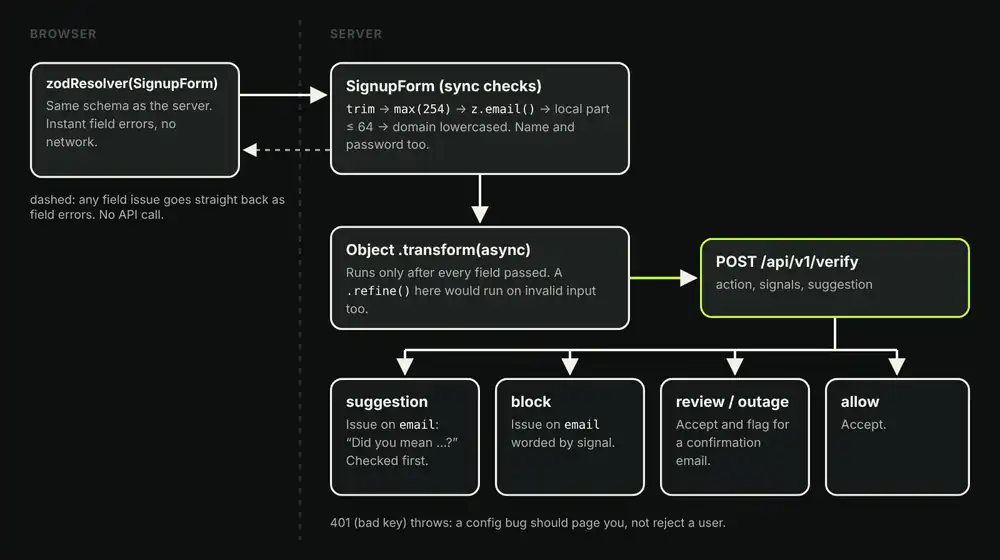
email path.import * as z from "zod";
import { SignupForm } from "./signup-schema";
export type Verdict = {
email: string;
status: "deliverable" | "risky" | "undeliverable" | "unknown";
action: "allow" | "review" | "block";
flagged: boolean;
signals: string[];
suggestion: string | null;
};
const API_URL = "https://emailverifier.dev/api/v1/verify";
// Returns null when the verifier can't answer. That is not evidence against the user.
export async function verifyEmail(email: string): Promise<Verdict | null> {
const key = process.env.EMAILVERIFIER_API_KEY;
let res: Response;
try {
res = await fetch(API_URL, {
method: "POST",
headers: { "Content-Type": "application/json", ...(key ? { "X-API-Key": key } : {}) },
body: JSON.stringify({ email }),
signal: AbortSignal.timeout(5000),
});
} catch (err) {
console.warn("email verifier unreachable:", (err as Error).name);
return null;
}
if (res.status === 401) throw new Error("EMAILVERIFIER_API_KEY is invalid"); // deploy bug
if (!res.ok) {
console.warn("email verifier returned", res.status); // 402 credits, 429 rate limit, 5xx
return null;
}
return (await res.json()) as Verdict;
}
const blockMessage = (signals: string[]) => {
if (signals.includes("disposable_address")) return "Please use a permanent email address";
if (signals.includes("mailbox_rejected")) return "That mailbox doesn't exist. Check the spelling";
if (signals.includes("no_mail_server") || signals.includes("invalid_domain"))
return "That domain can't receive email";
return "We can't send email to that address";
};
// A transform on the object only runs once every field has passed,
// so a half-filled form never costs a verification credit.
export const ServerSignup = SignupForm.transform(async (form, ctx) => {
const verdict = await verifyEmail(form.email);
if (verdict?.suggestion) {
// Check the typo first: gmial.com comes back as disposable_address AND possible_typo.
ctx.addIssue({
code: "custom",
path: ["email"],
message: `Did you mean ${verdict.suggestion}?`,
params: { suggestion: verdict.suggestion },
});
return z.NEVER;
}
if (verdict?.action === "block") {
ctx.addIssue({ code: "custom", path: ["email"], message: blockMessage(verdict.signals) });
return z.NEVER;
}
return {
...form,
// "review" (catch-all, inconclusive) and verifier outages: let them in, confirm by email.
emailNeedsConfirmation: verdict === null || verdict.action === "review",
emailSignals: verdict?.signals ?? [],
};
});The call uses POST /api/v1/verify with an X-API-Key header. Without a key it runs as a public demo limited to 10 requests per hour, which is how I ran the example below. The mapping follows the response fields:
suggestionis checked first. In my run,gmial.comcame back with bothdisposable_addressandpossible_typo. Checkingblockfirst would tell a Gmail user to "use a permanent address". The typo correction guide covers the UI for the suggestion.action: "block"becomes a field issue with a message chosen by signal, so a disposable address and a dead mailbox get different wording.reviewand verifier outages are accepted and flagged withemailNeedsConfirmation. That covers catch-all domains, where the server accepts every recipient (see catch-all domains), and 402, 429 or timeout responses, which say nothing about the user.- 401 throws. A bad key is a deploy problem; it should fail loudly, not reject a customer.
Running it against six addresses with the demo endpoint:
import * as z from "zod";
import { ServerSignup } from "./verify-email";

const base = { name: "Ada", password: "correct horse battery" };
for (const email of process.argv.slice(2)) {
  const result = await ServerSignup.safeParseAsync({ ...base, email });
  console.log(
    JSON.stringify(email).padEnd(34),
    result.success
      ? `ok  ${JSON.stringify({ email: result.data.email, confirm: result.data.emailNeedsConfirmation, signals: result.data.emailSignals })}`
      : `err ${JSON.stringify(z.flattenError(result.error).fieldErrors)}`,
  );
}
npx tsx src/demo.ts " Ada.Lovelace@Example.COM " "user..name@example.org" "ada@gmial.com" "ada@mailinator.com" "support@gmail.com" "zq-test-7731-nobody@gmail.com"" Ada.Lovelace@Example.COM " err {"email":["That domain can't receive email"]}
"user..name@example.org" err {"email":["Enter a valid email address"]}
"ada@gmial.com" err {"email":["Did you mean ada@gmail.com?"]}
"ada@mailinator.com" err {"email":["Please use a permanent email address"]}
"support@gmail.com" ok {"email":"support@gmail.com","confirm":true,"signals":["free_provider","role_address","verification_inconclusive","smtp_cannot_verify"]}
"zq-test-7731-nobody@gmail.com" err {"email":["That mailbox doesn't exist. Check the spelling"]}Five requests, not six: user..name@example.org never left the process. Example.COM was trimmed and its domain lowercased before the API saw it, and the API blocked it because example.com publishes a null MX record. support@gmail.com was accepted but flagged for confirmation: the API marked it a role address and could not verify the mailbox. If you only need the disposable check for one domain, the free disposable email checker answers it without code.
Showing the server's answer in React Hook Form
On the client, zodResolver(SignupForm) gives instant format errors from the same schema. The server's field errors come back through setError. With @hookform/resolvers 7.0.8 and react-hook-form 7.92.0 this type-checks against the schema above:
import { useForm } from "react-hook-form";
import { zodResolver } from "@hookform/resolvers/zod";
import { SignupForm, type SignupInput } from "./signup-schema";

type FieldErrors = Partial<Record<keyof SignupInput, string[]>>;

export function SignupFormView({ submit }: { submit: (data: SignupInput) => Promise<FieldErrors | null> }) {
  const { register, handleSubmit, setError, setValue, formState: { errors } } =
    useForm<SignupInput>({ resolver: zodResolver(SignupForm) });

  const onSubmit = async (data: SignupInput) => {
    const fieldErrors = await submit(data); // your server action or POST /signup
    for (const [field, messages] of Object.entries(fieldErrors ?? {})) {
      setError(field as keyof SignupInput, { type: "server", message: messages?.[0] });
    }
  };

  const suggestion = errors.email?.message?.match(/^Did you mean (.+)\?$/)?.[1];

  return (
    <form onSubmit={handleSubmit(onSubmit)} noValidate>
      <input type="email" autoComplete="email" {...register("email")} />
      {errors.email && <p role="alert">{errors.email.message}</p>}
      {suggestion && (
        <button type="button" onClick={() => setValue("email", suggestion, { shouldValidate: true })}>
          Use {suggestion}
        </button>
      )}
      {/* name and password inputs */}
      <button type="submit">Create account</button>
    </form>
  );
}
The suggestion button sets the corrected value and revalidates, so the user fixes a typo in one tap. The server action or route behind submit runs ServerSignup.safeParseAsync and returns z.flattenError(result.error).fieldErrors on failure. If your form is not built on Zod, the React Hook Form email validation guide shows the same server round trip with a plain API route.
Test the policy without spending credits
Stub fetch with node:test's mock.method and assert the two things that cost money: malformed input and an invalid sibling field must not call the API.
import { afterEach, mock, test } from "node:test";
import assert from "node:assert/strict";
import * as z from "zod";
import { ServerSignup } from "./verify-email";

const form = { name: "Ada", password: "correct horse battery", email: "ada@example.org" };
const verdict = (over: object) =>
  Response.json({ email: "ada@example.org", status: "deliverable", action: "allow",
    flagged: false, signals: [], suggestion: null, ...over });
const stubFetch = (impl: () => Promise<Response>) => mock.method(globalThis, "fetch", impl);
const emailErrors = (r: Awaited<ReturnType<typeof ServerSignup.safeParseAsync>>) =>
  r.success ? [] : z.flattenError(r.error).fieldErrors.email ?? [];

afterEach(() => mock.restoreAll());

test("malformed email never reaches the API", async () => {
  const f = stubFetch(async () => { throw new Error("API was called"); });
  for (const email of ["user..name@example.org", "a".repeat(300) + "@x.io", "a".repeat(65) + "@example.org"]) {
    const r = await ServerSignup.safeParseAsync({ ...form, email });
    assert.equal(r.success, false);
  }
  assert.equal(f.mock.callCount(), 0);
});

test("an invalid sibling field also skips the API", async () => {
  const f = stubFetch(async () => verdict({}));
  await ServerSignup.safeParseAsync({ ...form, password: "short" });
  assert.equal(f.mock.callCount(), 0);
});

test("typo suggestion wins over disposable_address", async () => {
  stubFetch(async () => verdict({ status: "risky", action: "block", flagged: true,
    signals: ["disposable_address", "possible_typo"], suggestion: "ada@gmail.com" }));
  const r = await ServerSignup.safeParseAsync({ ...form, email: "ada@gmial.com" });
  assert.deepEqual(emailErrors(r), ["Did you mean ada@gmail.com?"]);
  const issue = !r.success ? r.error.issues[0] : undefined;
  assert.equal(issue?.code === "custom" && issue.params?.suggestion, "ada@gmail.com");
});
npx tsx --test src/signup.test.ts# tests 10
# pass 10
# fail 0The full file has ten tests, including 402, 429, 503 and timeout fail-open, the 401 throw and domain lowercasing.
Before you upgrade Zod again
Re-run your fixtures. A change to the default email regex would not show up as a type error, and a deprecation warning in your editor is easy to ignore. Keep a list like the 20 inputs above in a test, assert accept or reject for each, and you will see any behaviour change on the day you bump the version. For verification itself, a new project includes 1,000 free checks, and pricing after that is $0.50 per 1,000.