
What Is Email Verification? A Practical Developer Guide
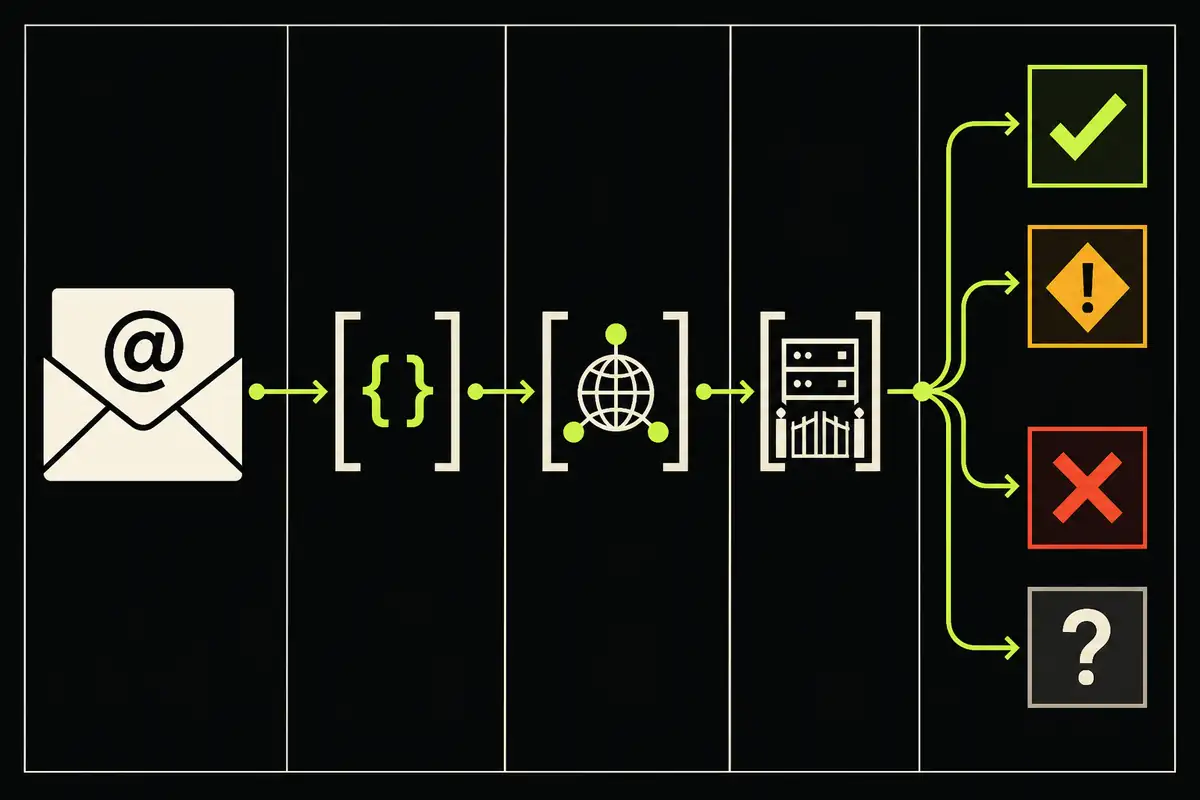
An email address can look perfect and still fail. It can also look risky and work just fine.
When I say email verification, I mean a series of checks that answer three separate questions: is the address structured correctly, can the domain receive mail, and what does the receiving server say about that mailbox?
The honest answer to the last question is sometimes “I don’t know.” That bit matters.
Email verification does not prove that a person owns an inbox. It does not guarantee that your next message will land there. It gives you evidence for a product decision.
What does email verification actually check?
I break verification into five layers:
- Syntax and address structure
- Domain and mail-routing DNS
- Provider and address-type signals
- SMTP recipient response
- A final status and recommended action
Each layer answers a narrower question. Combining them produces a useful result without pretending the result knows more than it does.
1. Syntax and address structure
The first check asks whether the address has a valid shape. That includes a local part, the @ separator, and a usable domain.
Well, that sounds simple until someone tries to validate every address with one heroic regular expression (I have no affection for those).
Email address syntax has edge cases. The formal addr-spec grammar lives in RFC 5322, section 3.4.1. A production signup form may support a sensible subset, but it should reject obvious structural failures before making a DNS or network request.
A syntax pass only means the string is shaped like an address. It says nothing about whether the domain exists or the mailbox accepts mail.
\n\nThe deeper state model is in Email Validation vs Verification vs Confirmation.
2. Domain and mail-routing DNS
Next, I check the domain after the @.
Mail systems normally use DNS Mail Exchange records to locate the server responsible for receiving a message. SMTP also defines fallback behavior when a domain has no MX record but does have an address record. The routing rules are covered by RFC 5321, section 5.1.
Some domains publish a null MX record to state that they do not accept email at all. That is a clear domain-level failure, defined in RFC 7505.
So what can DNS prove?
It can show that a domain appears able to receive mail, cannot receive mail, or leaves the answer unclear. It cannot confirm a specific mailbox.
3. Provider and address-type signals
Now I look at context around the address.
A disposable provider can make repeated trials, coupon abuse, and throwaway accounts easier. That is a risk signal, not proof that the person signing up is malicious.
\n\nUse the disposable-address signup policy to decide when that signal should block, confirm, or review.
A free provider is different. Gmail, Outlook, and similar consumer mailboxes are normal addresses for a consumer product. Blocking them because they are not company domains is usually a good way to reject legitimate users.
Role addresses such as support@, billing@, or hello@ may be shared by a team. They can receive mail perfectly well, but they may not identify one person.
Possible typos matter too. If someone enters a recognizable misspelling of a major provider, suggesting a correction is often better than silently accepting it.
You can inspect domain classifications in the email domain reports. I would still verify the full address before making the final decision.
4. SMTP recipient response
This is the mailbox-level check.
An SMTP client can connect to the receiving mail server and issue the normal envelope commands, including RCPT TO, without sending the message body. The command and reply behavior is specified in RFC 5321.
A clear rejection can support an undeliverable result. A clear acceptance can support a deliverable result.
But a server can also time out, defer the request, block probes, hide mailbox information, or accept every recipient. Treating any of those as a definite mailbox answer would be guesswork.
So what's the fix?
Keep the result unknown when the receiving system does not provide enough evidence. A timeout is not a rejection. A policy block is not proof that the mailbox is missing.
How SMTP Email Verification Works covers the command sequence, reply classes, and probe safety in detail.
5. Turn the evidence into a decision
I prefer four statuses because they preserve the difference between failure, risk, and uncertainty.
| Status | What the evidence says | Sensible default |
|---|---|---|
undeliverable |
There is a confirmed failure such as invalid syntax, no usable mail routing, or a mailbox rejection. | Block and ask for a correction. |
risky |
The address has a material risk signal such as a disposable provider or likely typo. | Block the typo. Apply a proportionate rule to disposable addresses. |
deliverable |
The available checks passed and the mailbox accepted the recipient probe. | Allow, unless a separate signal calls for review. |
unknown |
The address is not confirmed bad, but the mailbox result is inconclusive. | Review or allow with email confirmation. |
Notice what is missing: a magic “valid” boolean.
A single boolean forces uncertain addresses into yes or no. That makes an API easier to demo and harder to use safely.
Why catch-all domains need their own treatment
A catch-all domain accepts mail for addresses whether or not the named mailbox is real. If both real-person@domain.com and a random address are accepted, the server response cannot distinguish between them.
The domain can receive the message. The individual mailbox is still uncertain.
\n\nThe catch-all domain guide shows the random-recipient control and a risk-based handling matrix.
I would not block every catch-all result. Companies use catch-all routing for legitimate reasons. I would mark it for review, then use email confirmation or product-level abuse controls where the action is valuable.
Email verification and email confirmation solve different problems
Email verification evaluates the address before you send. Email confirmation sends a link or code and shows that someone with access to the inbox completed the step.
Neither proves a legal identity. And neither guarantees future inbox placement.
For a low-risk newsletter signup, verification may be enough to catch typos and dead addresses. For account recovery, payments, or sensitive actions, I would still require confirmation.
A practical signup policy
Your policy should match the cost of being wrong.
- Block confirmed syntax, routing, and mailbox failures.
- Show a correction when the address looks mistyped.
- Do not block a person simply for using a free provider.
- Treat disposable addresses according to the value or abuse risk of the action.
- Review catch-all and inconclusive results instead of converting them into fake certainty.
- Require email confirmation when inbox access matters.
What about a frictionless consumer signup?
That objection is fair. Extra steps can cost conversions. I would allow clean consumer addresses, keep unknown results out of the hard-failure bucket, and reserve confirmation for the point where ownership actually matters.
Verification should help your product make a better decision. It should not become a reason to reject everyone the network could not classify in a few seconds.
Try a real verification request
The emailverifier.dev REST API accepts one address at POST /api/v1/verify. With a project key, the server resolves the project from that key and uses one credit for the check.
curl https://emailverifier.dev/api/v1/verify \
  -H "Content-Type: application/json" \
  -H "X-API-Key: YOUR_API_KEY" \
  -d '{"email":"hello@emailverifier.dev"}'
When I checked that address on August 12, 2026, the live API returned:
{
  "email": "hello@emailverifier.dev",
  "status": "unknown",
  "action": "review",
  "flagged": false,
  "signals": [
    "role_address",
    "verification_inconclusive"
  ],
  "suggestion": null
}
That is not a weak result. It is the useful result.
The address is role-based, and the mailbox check did not justify a definite claim. The API kept both facts visible instead of guessing.
You can see every field in the REST API reference. The production result-handling guide maps HTTP failures and email decisions to an application state machine.
\n\nOr create an account, get 1,000 non-expiring starter credits on your first project, and test your own signup flow.
Keep the unknowns honest.